InfoSec University Hackathon
Challenge Write-up

Forensics
1 - Fix it - Easy
We are given a broken PNG file which we have to fix. I have seen a fair bunch of problems like these so it was pretty simple.
I search PNG header and head to wikipedia page
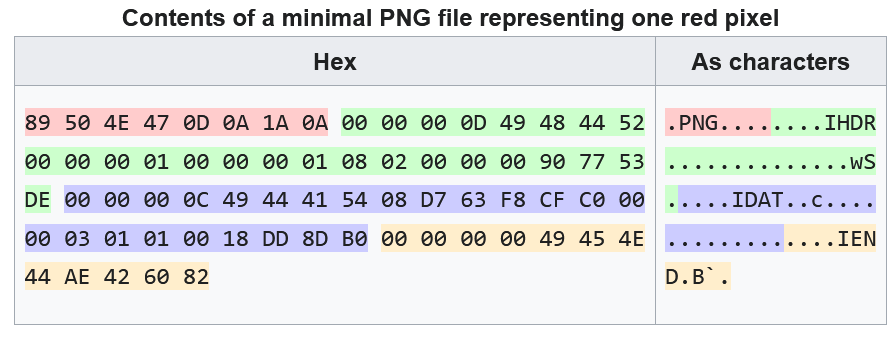
Check out the full article here - https://en.wikipedia.org/wiki/PNG
Using this structure i fix the broken PNG making use of a hex editor.
The highlighted colors in the picture makes it easy to analyze the different sections of a PNG image.
After fixing the image. mainly the header and the footer, which were broken. we can view the PNG and get the flag.
You can also make use of a small PNG file (valid) and compare it to the broken one.

2. Clip It Stash It - Medium
Description :-
I came across this disk while browsing through some old backups. There are only a few files, but something important was temporarily held here before fading away. Do you think you can figure it out?
We are given a .ad1 file to analyze. Due to previous experiences I knew the best tool to analyze AD1 files is FTKimager which makes our job a lot easier.
The Title of the Challenge made me think about clipboard data or something like that.
Initial Analysis
Before I start using any tool ( FTKimager ) to do proper analysis, i use strings and grep a few strings that might give a hint towards anything also try to grep the flag ( with some basic encodings ) as sometimes they are hardcoded and the challenge becomes trivial.
After a bunch of trials and filtering we find….. a whole bunch of nothing. so lets do some proper analysis
FTKimager
We find a User named br0ck which the data is related about.
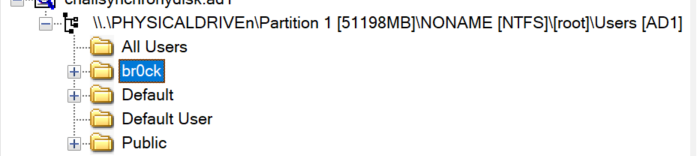
In this chall i went down a LOT of rabbitholes because of not actually figuring out where i should be looking at.
First, I make a run through the interesting folders like Downloads, Documents, etc I do find some files like images and 1 in particular called fleg.jpg which was just a troll.
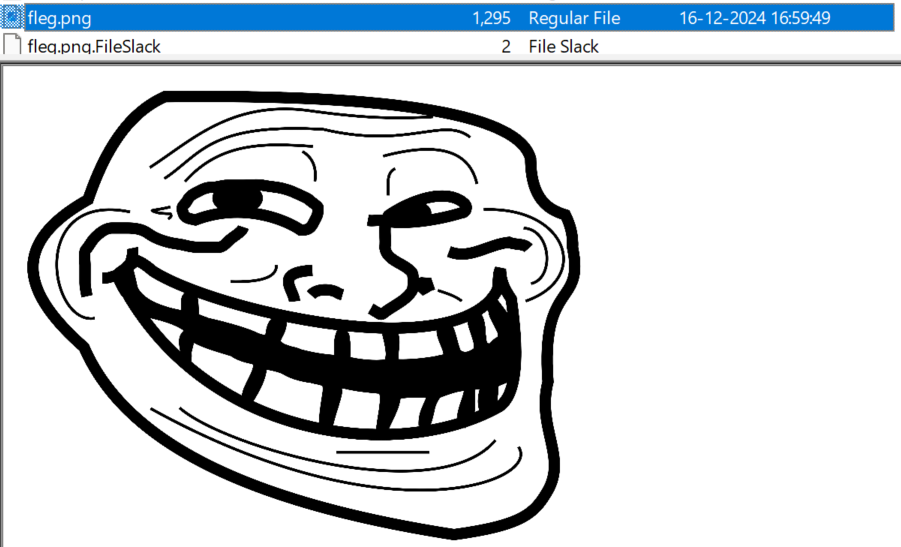
After all that and making sure they didn’t have any hidden data i move on to the next rabbit hole.
Next one was me dumping the NTUSER.DAT file and scouring through that for a long time. only to find nothing.
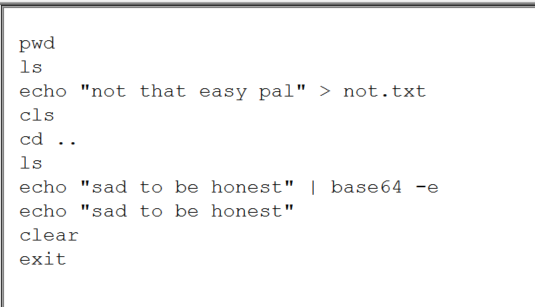
Also found this powershell history.…
Then after a bunch of other stuff which I don’t even remember. I was kinda fed up and moved to a different challenge. After revisiting this challenge and asking GPT on its views ‘yet again’ it finally gave a viable answer.
br0ck\AppData\Local\Packages This directory held the key for the challenge. This directory holds application-specific data and configuration files for apps.
After reviewing a few of the apps i see this app

My eyes rise, rejuvenating a long-lost sense of hope after an long period of despair
Within this there is a subdirectory named localstate, which I learnt after some googling stores local, persistent data. It consisted of a database file. and some never seen before database extensions like .sqlite-wal , now i do know .sqlite but this was a new one.
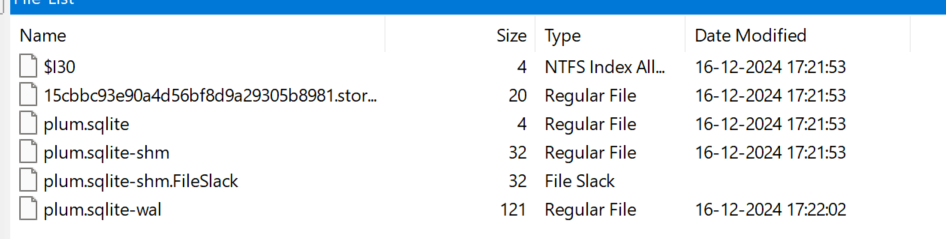
I quickly find out that the wal stands for Write-Ahead Log file which stores changes which are not in the main database yet. ( .sqlite )
I dump out the whole folder and view the sqlite file. in the .sqlite file i find the partial flag. I try to analyze the .sqlite-wal file but i am unable to. So i just do strings and grep on it with the partial flag we had and we get the flag,

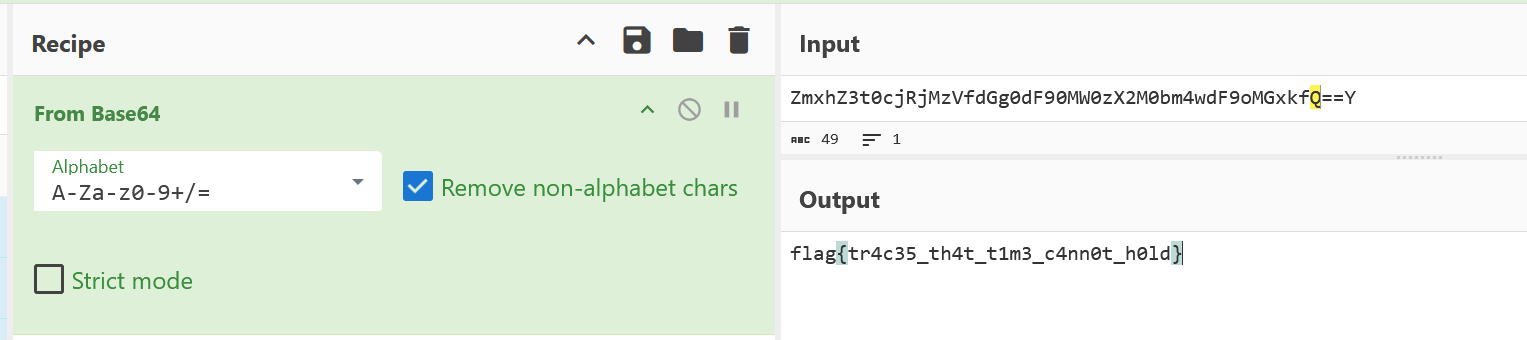
flag is encoded in base64 after decoding we get the flag
3. Reckoning - Hard
Description - Fred had just completed his project when he decided to run a file sent by a friend, promising to speed up his system and clean unnecessary files. Moments after running it, chaos struck—his project files, representing weeks of hard work, were corrupted, and a ransom note appeared demanding payment to recover them. Can you help Fred outsmart the attackers and recover his data from this cyber fraud?
Mirror: https://mirror.eng.run/chall.raw
Memory forensics, one of my favorite type of forensics challs.
Now, lets take a moment to analyze the description. We know
- Fred was sent something by his friend ( what kinda friend sends a ransomware )
- After running it ( maybe a exe ) the files got encrypted a ransom note appeared
So, Our goal is to see if we can get hands on the file being sent by the friend so that we can potentially analyze it.
I’ll be using Volatility 3 for doing the analysis. you can refer to this for the full commands https://blog.onfvp.com/post/volatility-cheatsheet/ and the original volatility 3 github repository for the installation
Volatility 3
Firstly I do the windows.info to get the basic machine info and to check if volatility is ‘working’ cause volatility is notorious for not working, atleast for me. ( i am serious, sometimes it just outright refuses to work even though its working on others machines )
After confirming that it is working we get to the job. firstly we run the windows.pslist to get info about the running processing at the time of the dump.
In this we find 2 interesting processes

I note these down and move onto next command on my list windows.filescan and store the output in a file as the output is generally too much but i need to grep a few times so its better to save the output rather than run it again. ( same for pslist )
I like to view the files on some of the common directories ( Documents, Downloads, Desktop , etc ).
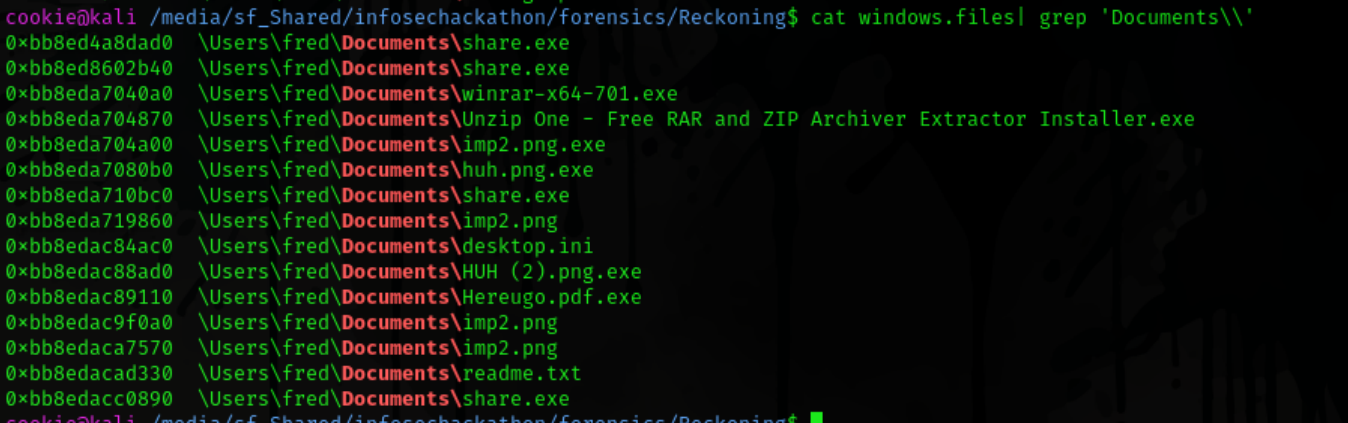
And there we go there are some interesting files on the Documents folder and also share.exe. so we dump it out cuz it is pretty suspicious. as we already flagged it through our pslist command.
we dump files using the windows.dumpfiles ‑‑virtaddr <offset> command of volatility 3
also what is the imp2.png…..

Share.exe Analysis
I open up share.exe in ida and try to view the code… the code is full of subroutines and no actual functions are seen so I do strings on the dumped file and find the string related to pyinstaller. now i have seen a bit of pyinstaller packed applications so heres the process to analyze them in short.
We require 2 programs pycdc and pyinstxtractor
First we extract the files using pyinstxtractor and then using its output we decompile a .pyc file which is behind the whole operation.
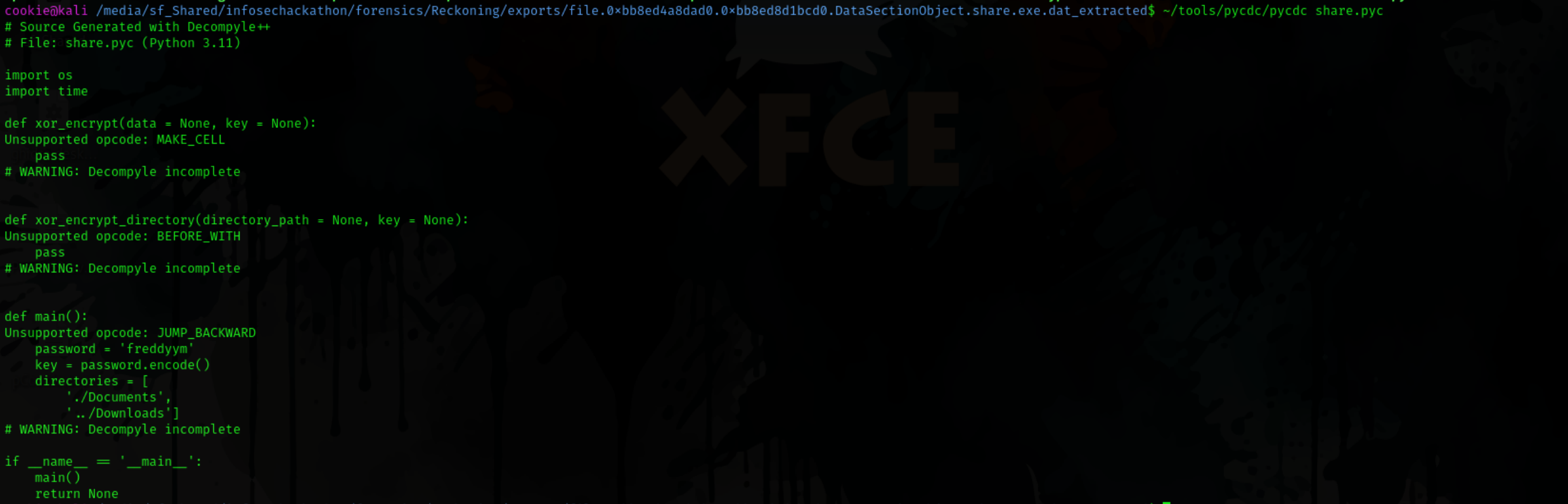
The decompilation isn’t full but we get key information the ransomware uses XOR to encrypt the files with the password freddyym and it encrypted files in Downloads and Documents. as we know there are a few files in Documents which are not viewable properly so we will try decrypting them.
I use cyberchef to xor decrypt the hereyougo file and its revealed to be a pdf file.

And we get the flag from the file.
Even though this chall is rated hard i found it easier as it pretty straightfoward once you know what to do ( although its the same case with the previous challenge 😛 )
Reverse
1. Rev1 - Easy
This chall… well it shouldn’t have given me much trouble but it did. I opened the binary in ida and viewed at the reverse code.
It had a remote instance where the real flag was printing.
heres how the binary worked.
- Predefined functions for some basic operations on a byte
- It read the flag from the
flag.txtfile. and copied it to a variable. - It set a seed based on the current time
- Used the seed to determine which byte of the flag will get which operation specified to encode the byte.
- Took users input and verified if the length is correct ( +1 for \n )
- Printed the encrypted flag regardless of the length.
So reversing it shouldnt be much hassle as we just needed to get the time at which the seed is set and just reverse the encryption using that seed. So that we need to match the randomness created by the program.
Well… after like.. 10 attempts at making my script work the intended way. I failed. I brute-forced the timestamp even though i was sure the time was correct… well i failed again.. apparently i was doing something wrong when assigning which byte should go to which function.
Well after spending too much time on this instead of fixing the code which I couldn’t I thought of a new way to bruteforce.
I ran the encrypted flag through all the functions and then stored the output in a file. I could see that the functions were correct as when i passed the enc byte through all the flags starting was visible flag{ but I had to guess the other parts.
It was hard cause well… the flag wasnt human readable, i mean a meaningful sentence but a base64 string like other challenges.
So my next idea was to get some extra enc flag instances and then run it through a script which ranked each byte decryption per its occurance frequency. and… it worked..
Altho this is not the intended way it worked.. and I prolly wasted 3 hours on this.
1
2
3
4
5
6
7
8
9
10
11
12
13
14
15
16
17
18
19
20
21
22
23
24
25
26
27
28
29
30
31
32
33
34
35
36
37
38
39
40
41
42
43
44
45
46
47
48
49
50
51
52
53
54
55
56
57
58
59
60
61
62
63
64
65
66
67
68
69
70
71
72
73
74
75
76
77
78
79
80
81
82
83
84
85
from collections import Counter

## Transformation functions
def t1(a1): return ((a1 >> 4) | (a1 << 4)) & 0xFF
def t2(a1): return ~a1 & 0xFF
def t3(a1): return ((a1 << 3) & 0xFF) | (a1 >> 5)
def t4(a1): return ((a1 >> 6) | (a1 << 2)) & 0xFF
def t5(a1): return a1 ^ 0xAA
def t6(a1): return (a1 - 7) % 256
def t7(a1): return ((a1 << 2) & 0xFF) | (a1 >> 6)
def t8(a1): return (a1 - 85) % 256
def t9(a1): return (a1 // 3)

## List of hex strings to process
hex_strings = [
    "991B68D984F3EDADE7A857CBC8CE5B60C85BCC095E4193899A4F889292D782",
    "661BB6D9D1AE76AD54D40A9C26CE152B59AB99845EC093CBCF12EE44A7D782",
    "991B16EC6FAEED0BE76A148969B9A9605945BBB7D3944C9DAC847E4F4F841E",
    "99C62CCD84584DADE75AA586266B45F37AA9CC4F6B419B89BA127E92D35F1E",
    "3273B6BC6FFB4D5FA96A050D9D198A0BDC15BBE297C138676C127744D35FA0",
    "CC1B68D984AEDBADE76A0A43B7464595C81599095E72387D56097E44445F1E",
    "BB1B2C35B72A4DA7A9A8A59E98191556595B99845E414CCE59127EB7928211",
    "661B58D982A6DBA753D4A543B7CEA92B3715999D2F41CE9D2FE27792A78211",
    "6D44B66EB7F3768553F90A0D98B9A92B6EFCCC12D3C14C622F4F7E44A75F1E",
    "6D732C6EB7F3C45FD45A140D264615957A45999D2FC1139D594F7E4F4F5FA0",
    "6DC616ECB715ED16A2D4AF869846FEA659FE99125EDA86672FE2DDC2D3D21E",
    "32445835DEA6F6ADE7F9FA0D26CEA956598ACCE286DA26CB59E2DD4FC2D75F",
    "32C6CB98B7F3C4A7E735059C9D8C45A6DC5B998480B693CB9AB7DD449784A0"
]

byte_lists = [[int(hex_string[i:i+2], 16) for i in range(0, len(hex_string), 2)] for hex_string in hex_strings]

results = {}

## Transformation functions in a list
transforms = [t1, t2, t3, t4, t5, t6, t7, t8, t9]

## Process each byte list for each hex string
## Process each byte list for each hex string
for i, func in enumerate(transforms, 1):
    for idx, byte_list in enumerate(byte_lists):
        transformed = []
        for byte in byte_list:
            try:
                result = func(byte)
                if 32 <= result <= 126:  ## Check if the result is within the printable ASCII range
                    transformed.append(chr(result))
                else:
                    transformed.append('?')  ## Mark non-printable characters with '?'
            except Exception:
                transformed.append('?')  ## If error occurs, mark with '?'
        results[f"t{i}_hex{idx+1}"] = transformed

## Count most frequent characters at each position across all hex strings
most_common_chars = []
for i in range(len(byte_lists[0])):  ## Assuming all hex strings are the same length
    chars_at_pos = []

    ## Collect characters at position i from all transformed hex strings for each function
    for idx in range(len(hex_strings)):
        for j in range(len(transforms)):
            char = results[f"t{j+1}_hex{idx+1}"][i]
            if char != '?':  ## Exclude '?' characters from counting
                chars_at_pos.append(char)

    ## Count frequency of characters using Counter
    counter = Counter(chars_at_pos)

    ## Find the most common printable character (if exists)
    most_common_char, count = counter.most_common(1)[0]
    if 32 <= ord(most_common_char) <= 126:  ## Check if the character is printable
        most_common_chars.append(most_common_char)
    else:
        most_common_chars.append('?')  ## If no printable character found, use '?'

## Output the most frequent characters
flag = ''.join(most_common_chars)

## Print the results
print(f"Most frequent characters per position: {flag}")

## Optional: Save the flag to a file
with open('flag.txt', 'w') as f:
    f.write(flag)
Flag Acquired - flag{QoXMSP4bdTYsTfHyk1veHw==}
After the CTF was over I realised my mistake. In order for the srand() function in C to work correctly it also needs to be compiled in a similar environment. I was compiling C using windows before thats why my reversal script was not working correctly. After compiling on a linux instance it worked as expected.
2. Rev 2 - Medium
Description - It’s time to show that we are ‘more than meets the eye’.
Well, Due to the trauma I was skeptical if i would be able to solve it but to my surprise this was easier.
After analyzing the program I saw that the program took in a string and compared it directly to the one hardcoded so i hex decoded the string and it came out as to_be_or_not_to_be
After using that the program asked for a feedback. .. interesting..
in Ida the function appeared as BUG()
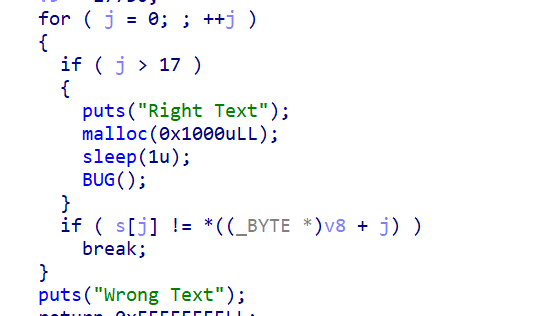
So I went on to see the other functions as there wasnt any function named BUG directly. and i found sub_1350 resembling the functionality of the BUG() code as there was a string ( in decimal ) which when decoded translated to ‘feedback’
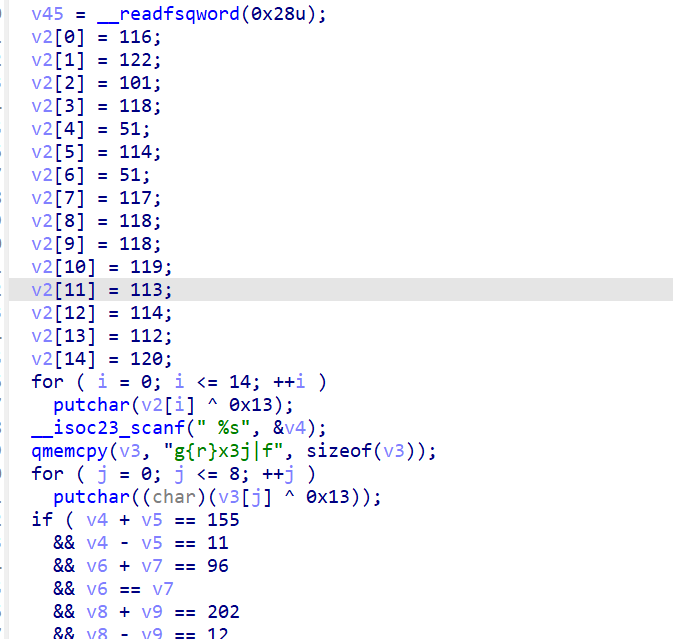
The code did a bunch of operations so I just made a python script to do the heavy lifting for me
1
2
3
4
5
6
7
8
9
10
11
12
13
14
15
16
17
18
19
20
21
22
23
24
25
26
27
28
29
30
31
32
33
34
35
36
37
38
39
40
41
42
43
44
45
46
47
48
49
50
51
52
53
54
55
56
57
58
59
60
61
62
63
64
65
66
67
68
69
70
71
72
73
74
75
76
77
78
79
80
81
82
83
84
85
86
87
88
89
90
91
92
93
94
95
96
97
98
99
100
101
102
103
104
105
106
107
108
109
110
111
112
113
114
115
116
117
118
119
120
from itertools import product

def check_constraints(v4, v5, v6, v7, v8, v9, v10, v11, v12, v13, v14, v15, v16, v17, v18, v19,
                      v20, v21, v22, v23, v24, v25, v26, v27, v28, v29, v30, v31, v32, v33,
                      v34, v35, v36, v37, v38, v39, v40, v41, v42, v43, v44):
    ## Apply all constraints
    return (
        v4 + v5 == 155 and v4 - v5 == 11 and
        v6 + v7 == 96 and v6 == v7 and
        v8 + v9 == 202 and v8 - v9 == 12 and
        v10 + v11 == 159 and v10 - v11 == -49 and
        v12 + v13 == 168 and v12 - v13 == -64 and
        v14 + v15 == 178 and v14 - v15 == 12 and
        v16 + v17 == 216 and v16 - v17 == 8 and
        v18 + v19 == 165 and v18 - v19 == -63 and
        v20 + v21 == 196 and v20 - v21 == 6 and
        v22 + v23 == 191 and v22 - v23 == -17 and
        v24 + v25 == 221 and v24 - v25 == -11 and
        v26 + v27 == 147 and v26 - v27 == 43 and
        v28 + v29 == 216 and v28 == v29 and
        v30 + v31 == 195 and v30 - v31 == -5 and
        v32 + v33 == 107 and v32 - v33 == -3 and
        v34 + v35 == 203 and v34 - v35 == -13 and
        v36 + v37 == 221 and v36 - v37 == -11 and
        v38 + v39 == 215 and v38 - v39 == -13 and
        v40 + v41 == 213 and v40 - v41 == -19 and
        v42 + v43 == 231 and v42 - v43 == 3 and
        v44 == 101
    )

def solve_constraints():
    ## Generate all combinations of values for the variables
    results = []
    fixed_value = 101  ## v44 is fixed
    for v4, v5 in product(range(256), repeat=2):
        if v4 + v5 != 155 or v4 - v5 != 11:
            continue
        for v6, v7 in product(range(256), repeat=2):
            if v6 + v7 != 96 or v6 != v7:
                continue
            for v8, v9 in product(range(256), repeat=2):
                if v8 + v9 != 202 or v8 - v9 != 12:
                    continue
                for v10, v11 in product(range(256), repeat=2):
                    if v10 + v11 != 159 or v10 - v11 != -49:
                        continue
                    for v12, v13 in product(range(256), repeat=2):
                        if v12 + v13 != 168 or v12 - v13 != -64:
                            continue
                        for v14, v15 in product(range(256), repeat=2):
                            if v14 + v15 != 178 or v14 - v15 != 12:
                                continue
                            for v16, v17 in product(range(256), repeat=2):
                                if v16 + v17 != 216 or v16 - v17 != 8:
                                    continue
                                for v18, v19 in product(range(256), repeat=2):
                                    if v18 + v19 != 165 or v18 - v19 != -63:
                                        continue
                                    for v20, v21 in product(range(256), repeat=2):
                                        if v20 + v21 != 196 or v20 - v21 != 6:
                                            continue
                                        for v22, v23 in product(range(256), repeat=2):
                                            if v22 + v23 != 191 or v22 - v23 != -17:
                                                continue
                                            for v24, v25 in product(range(256), repeat=2):
                                                if v24 + v25 != 221 or v24 - v25 != -11:
                                                    continue
                                                for v26, v27 in product(range(256), repeat=2):
                                                    if v26 + v27 != 147 or v26 - v27 != 43:
                                                        continue
                                                    for v28, v29 in product(range(256), repeat=2):
                                                        if v28 + v29 != 216 or v28 != v29:
                                                            continue
                                                        for v30, v31 in product(range(256), repeat=2):
                                                            if v30 + v31 != 195 or v30 - v31 != -5:
                                                                continue
                                                            for v32, v33 in product(range(256), repeat=2):
                                                                if v32 + v33 != 107 or v32 - v33 != -3:
                                                                    continue
                                                                for v34, v35 in product(range(256), repeat=2):
                                                                    if v34 + v35 != 203 or v34 - v35 != -13:
                                                                        continue
                                                                    for v36, v37 in product(range(256), repeat=2):
                                                                        if v36 + v37 != 221 or v36 - v37 != -11:
                                                                            continue
                                                                        for v38, v39 in product(range(256), repeat=2):
                                                                            if v38 + v39 != 215 or v38 - v39 != -13:
                                                                                continue
                                                                            for v40, v41 in product(range(256), repeat=2):
                                                                                if v40 + v41 != 213 or v40 - v41 != -19:
                                                                                    continue
                                                                                for v42, v43 in product(range(256), repeat=2):
                                                                                    if v42 + v43 != 231 or v42 - v43 != 3:
                                                                                        continue
                                                                                    if check_constraints(
                                                                                        v4, v5, v6, v7, v8, v9, v10, v11,
                                                                                        v12, v13, v14, v15, v16, v17, v18, v19,
                                                                                        v20, v21, v22, v23, v24, v25, v26, v27,
                                                                                        v28, v29, v30, v31, v32, v33, v34, v35,
                                                                                        v36, v37, v38, v39, v40, v41, v42, v43,
                                                                                        fixed_value
                                                                                    ):
                                                                                        results.append(
                                                                                            (v4, v5, v6, v7, v8, v9, v10, v11,
                                                                                             v12, v13, v14, v15, v16, v17, v18, v19,
                                                                                             v20, v21, v22, v23, v24, v25, v26, v27,
                                                                                             v28, v29, v30, v31, v32, v33, v34, v35,
                                                                                             v36, v37, v38, v39, v40, v41, v42, v43,
                                                                                             fixed_value
                                                                                        )
                                                                                        )

    return results

if __name__ == "__main__":
    solutions = solve_constraints()
    for solution in solutions:
        print("Valid Solution:", solution)
        ascii_solution = ''.join(chr(x) for x in solution)
        print("Valid Solution (ASCII):", ascii_solution)

Using this string and trying it on the remote I get the flag.

3. Reverse 3 - Hard
Do you think you know reversing because you can analyse the files? Well, let’s see how good you are when there are no files!
Yea… so this one was interesting. We didn’t have any attachments but had to write a script to solve the questions from a nc instance .
Working:
- I would be sent a file base64 encoded
- It asked for a password
- If the password was correct I would pass onto next stage .
At first i did some manually and found that the password was just a hardcoded string ( which I was wrong about ) but i had to automate this so I used pwntools and a bunch of filtering commands to do this:
- get the base64 data
- decode and save as a file
- do strings on the file
- and get the first string as it was the password
after making a successful script which did all that . i ran into a problem… it was giving corrrect for few and wrong for others

I thought at first there was something wrong with the instance or something. but then I manually analyzed the failed binary password.
turns out… some files didnt use the password directly but performed a simple xor operation with a single digit on it. now… the problem became much harder… as not only i had to figure out if the bin was doing xor or not but i also had to figure out by what..
Although there was something that is what saved me in this challenge… which was that the files were all same sized… and the addresses did not change at all.
After a few attempts to make python-gdb work. i failed again… as i thought that would be my hope to read the registers and get the amount it was xoring with…. and I ran out of time… and the ctf ended….. or so i thought. but just 2 minutes before the end this was posted on the discord

I was overwhelmed with joy as I got that extra time to solve this challenge.
Although my problems were far from over as i still needed to figure out how to get the xor key and firstly figure out if the file was being xored in the first place.
then I tried something interesting.
using objdump -d I could make it so I can understand if the file was being xored
and using xxd i could get that specific byte which was the xor key as the files were all same sized ( our saviour )
So this is what i cooked -
- Save file
- Check if 2 instances of
xorare there in the objdump output as 1 was performed in all files and 2nd was if the flag was beingxored - If it was being xored get the key
- extract the password ( same as before )
- then send the password (
xorif the password was xored in the binary)
solve script
1
2
3
4
5
6
7
8
9
10
11
12
13
14
15
16
17
18
19
20
21
22
23
24
25
26
27
28
29
30
31
32
33
34
35
36
37
38
39
40
41
42
43
44
45
46
47
48
49
50
51
52
53
54
55
56
57
58
59
60
61
62
63
64
from pwn import *
import base64
import gzip
import shutil
import io
import subprocess
import re
import time

def read_file(string):
    base64_string = string
    print(f'base64 string = {base64_string}')
    compressed_data = base64.b64decode(base64_string)

    with gzip.GzipFile(fileobj=io.BytesIO(compressed_data), mode='rb') as f_in:
        with open('decompressed_output', 'wb') as f_out:
            shutil.copyfileobj(f_in, f_out)

    print("Decompression complete. Output saved to 'decompressed_output'.")

def get_key():
    command = "xxd -s 0x2014 -l 2 decompressed_output | cut -d ' ' -f2"
    result = subprocess.run(command, shell=True, capture_output=True, text=True)

    return(result.stdout.strip())

def check_xor():
    command = "objdump -d decompressed_output | grep -o 'xor' | wc -l"
    result = subprocess.run(command, shell=True, capture_output=True, text=True)
    return int(result.stdout.strip())

def get_pass():
    def get_first_string(file_path):
        result = subprocess.run(['strings', file_path], stdout=subprocess.PIPE, stderr=subprocess.PIPE)
        output = result.stdout.decode('utf-8').splitlines()
        if output:
            return output[0]
        else:
            return "No strings found"

    file_path = 'decompressed_output'
    if check_xor() == 2:
        key = get_key()
        first_string = get_first_string(file_path)
        result = ''.join(chr(ord(c) ^ int(key)) for c in first_string)
        return result
    else:
        first_string = get_first_string(file_path)
        return (first_string.strip())

context.log_level = 'debug'
conn = remote('13.234.240.113', '30927')

pattern = r"b'([A-Za-z0-9+/=]+)'"

while (True):
    data1 = conn.recv().decode()
    match = re.search(pattern, data1)
    if match:
        read_file(match.group(1))
    else:
        exit
    time.sleep(0.5)
    conn.sendline(get_pass().encode())
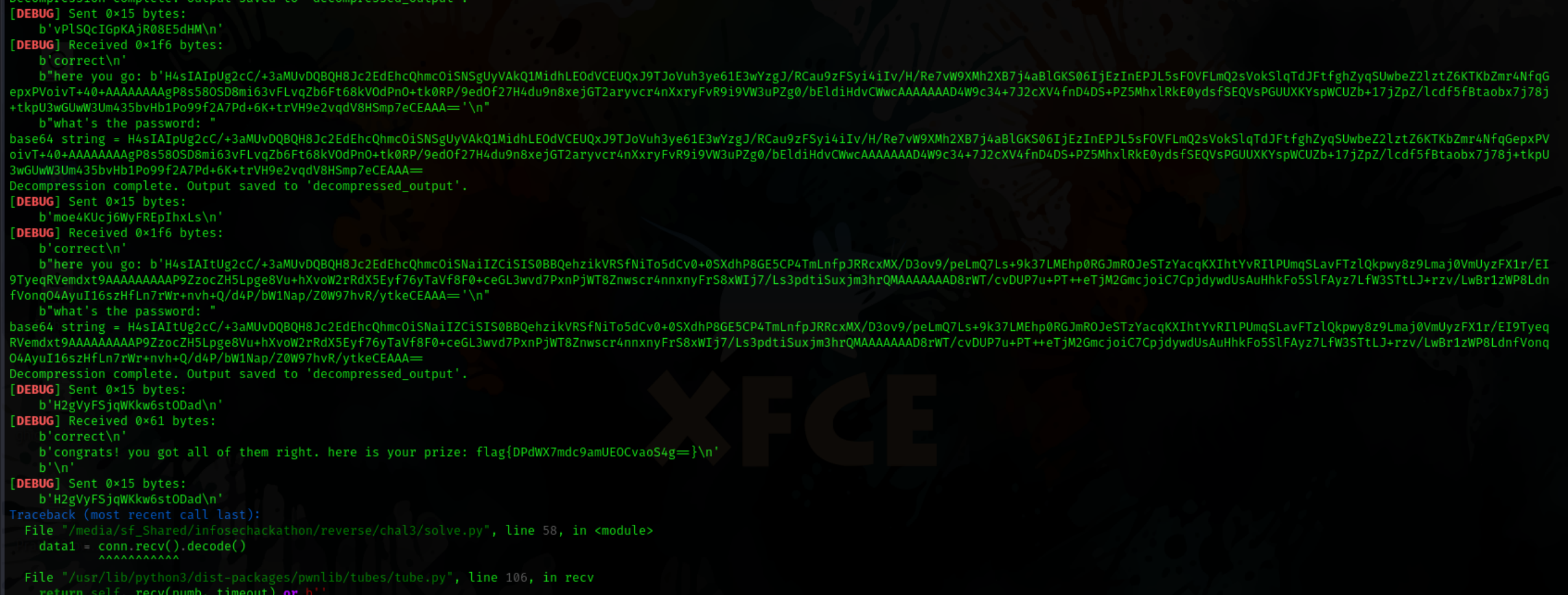
And there we go the sweet sweet flag. Very interesting challenge.
Mobile
1. CalcIOS - Easy
Description - Finally iOS has a better calculator.
I have never done IOS challenges before so this was a new type of challenge for me. had to get new tools as well.
We are given a IPA file and after running file on it I found it its just like android and is a zip file
Firstly I unzipped the application and then saw the files inside. My usual methods wouldnt work so I ran strings on the whole unzipped folder and ran grep
i grepped http and found out a link. potentially interesting as we had a nc instance as well.

it required a config id. for flag. so my best guess was the next step was the get the apps. config id.
After a bunch of research i found a tool plistutil which converted .plist files to human readable
after running this command plistutil -i Info.plist -o output.plist I was able to read the plist data and found the AppConfigID and this was the solution to get the flag.
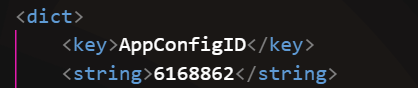
PS - installing the tool was more time taking than getting to the solution 😕
Well that’s to be expected as it was my first time analyzing a IOS app.
2. Secure Bank - Medium
Description:
SecureBank Pvt Ltd is releasing their beta version of the banking application for bug bounty hunters. The test credentials for test account are as follows:
- Account Number:
667614145 - PIN:
1260585352
This was a android challenge. which also had a nc instance for getting the final flag.
I use my trusty jadx gui for static analysis of the file and use android studio to spawn in a android device where i run my apk file.
So I begin by running the apk file. It asks for a url first I just put a dummy one there for testing purposes.
Then I have to enter the ac no and the pin.
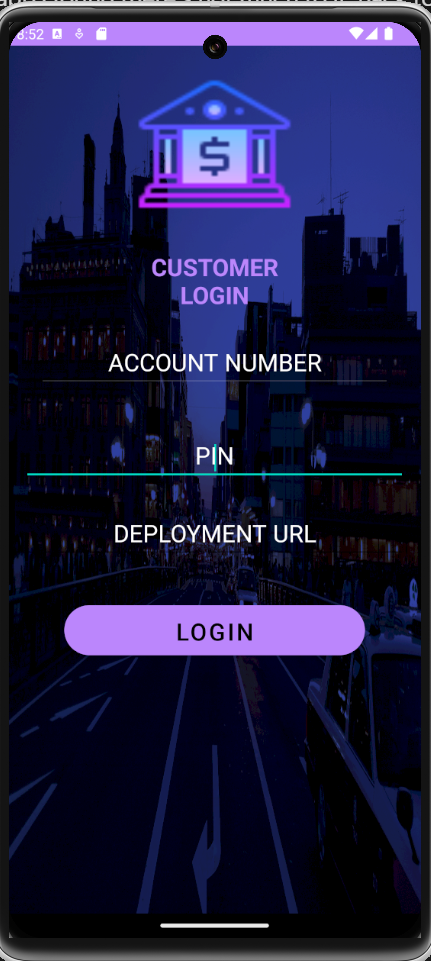
After roaming around the app i found there’s not much to it. Back to static analysis we go
While doing static analysis we find this interesting piece of code. this looks like the url we should visit to get the flag.
So, we just need id, and pin of the user hmm…
1
Volley.newRequestQueue(this).add(new StringRequest(0, getIntent().getStringExtra("depl_URL") + "/user/" + getIntent().getStringExtra("id") + "?secret=" + getIntent().getStringExtra("pin")
using jadx i see that in resources → assets, there is a db file. Then i view the assets folder after unzipping the apk. and open the db using a sqlite viewer.
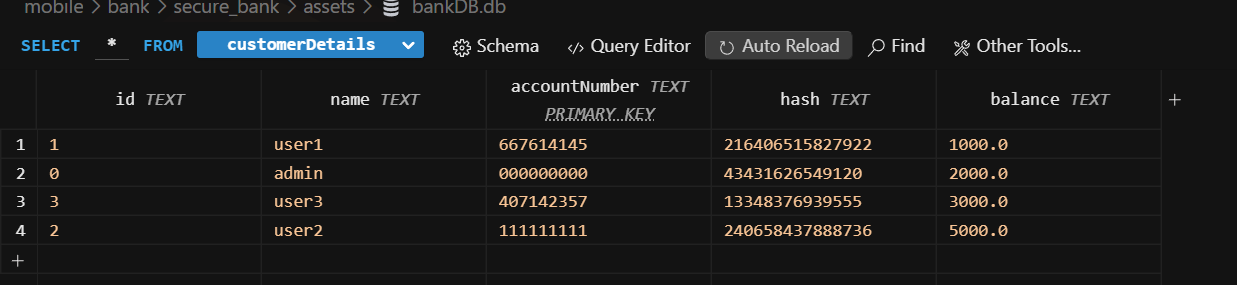
We find out we have access to db and there is admin account. the id of the admin is now acquired.
But the pin is not present… its hashed. lets see if we can find a hashing function in the code
after viewing the customer_login_page we find this function that is used to create the hash
1
2
3
4
5
6
7
8
9
10
11
12
13
14
publicstatic Long hash(Long l) {

        Long valueOf = Long.valueOf(((l.longValue() & 2863311530L) >>> 1) | ((l.longValue() & 1431655765) << 1));

        Long valueOf2 = Long.valueOf(((valueOf.longValue() & 3435973836L) >>> 2) | ((valueOf.longValue() & 858993459) << 2));

        Long valueOf3 = Long.valueOf(((valueOf2.longValue() & 4042322160L) >>> 4) | ((valueOf2.longValue() & 252645135) << 4));

        Long valueOf4 = Long.valueOf(((valueOf3.longValue() & 4278255360L) >>> 8) | ((valueOf3.longValue() & 16711935) << 8));

return Long.valueOf((valueOf4.longValue() >>> 16) | (valueOf4.longValue() << 16));

    }
This is not a very secure hashing function and can be reversed.
So I made a python script to reverse it. First I checked with our given pin and hash from the db to see if its working correctly and it does
Reverse_hashing
1
2
3
4
5
6
7
8
9
10
11
12
13
14
15
16
17
18
19
20
21
22
def reverse_hash(hashed_value):
    step4 = ((hashed_value << 16) & 0xFFFFFFFFFFFFFFFF) | (hashed_value >> 16)

    step3 = (((step4 << 8) & 0xFF00FF00FF00FF00) |
             ((step4 >> 8) & 0x00FF00FF00FF00FF))

    step2 = (((step3 << 4) & 0xF0F0F0F0F0F0F0F0) |
             ((step3 >> 4) & 0x0F0F0F0F0F0F0F0F))

    step1 = (((step2 << 2) & 0xCCCCCCCCCCCCCCCC) |
             ((step2 >> 2) & 0x3333333333333333))

    original = (((step1 << 1) & 0xAAAAAAAAAAAAAAAA) |
                ((step1 >> 1) & 0x5555555555555555))

    return original & 0xFFFFFFFF

hashed_value = 43431626549120
original_value = reverse_hash(hashed_value)

print(f"Pin: {original_value}")
Pin: 31733100
The pin of the admin is now acquired. time to form the link using the parameters and visit on the remote instance.
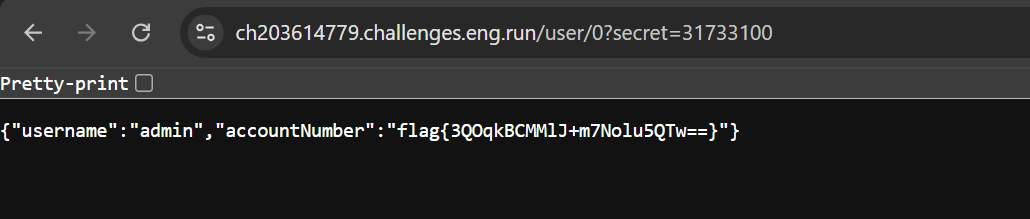
And there we go. we have found the flag.
Web
1. Challenge 1 - Easy
Description :- Looks like I have finally found a website where I can get all the images without visiting the website. Is that all?
We are given a simple website where we have to put a link to a image and the image will be shown on the website.
We are given the source code of the website so I go on to examine it, info I gathered :
- 2 web instances are hosted.
- 1 is on port 1234 and 1 is on port 80
admin.pyis running on port 80 and is responsible for showing the flag. but we do not have access to it.- Normal website running on the port 1234 is what we have access to.
So to access the website hosted on port 80 we can simply visit localhost:80 using our image viewing website which we have access to, but there’s a catch.
All private Ips are filtered and there is almost no way to bypass that directly.
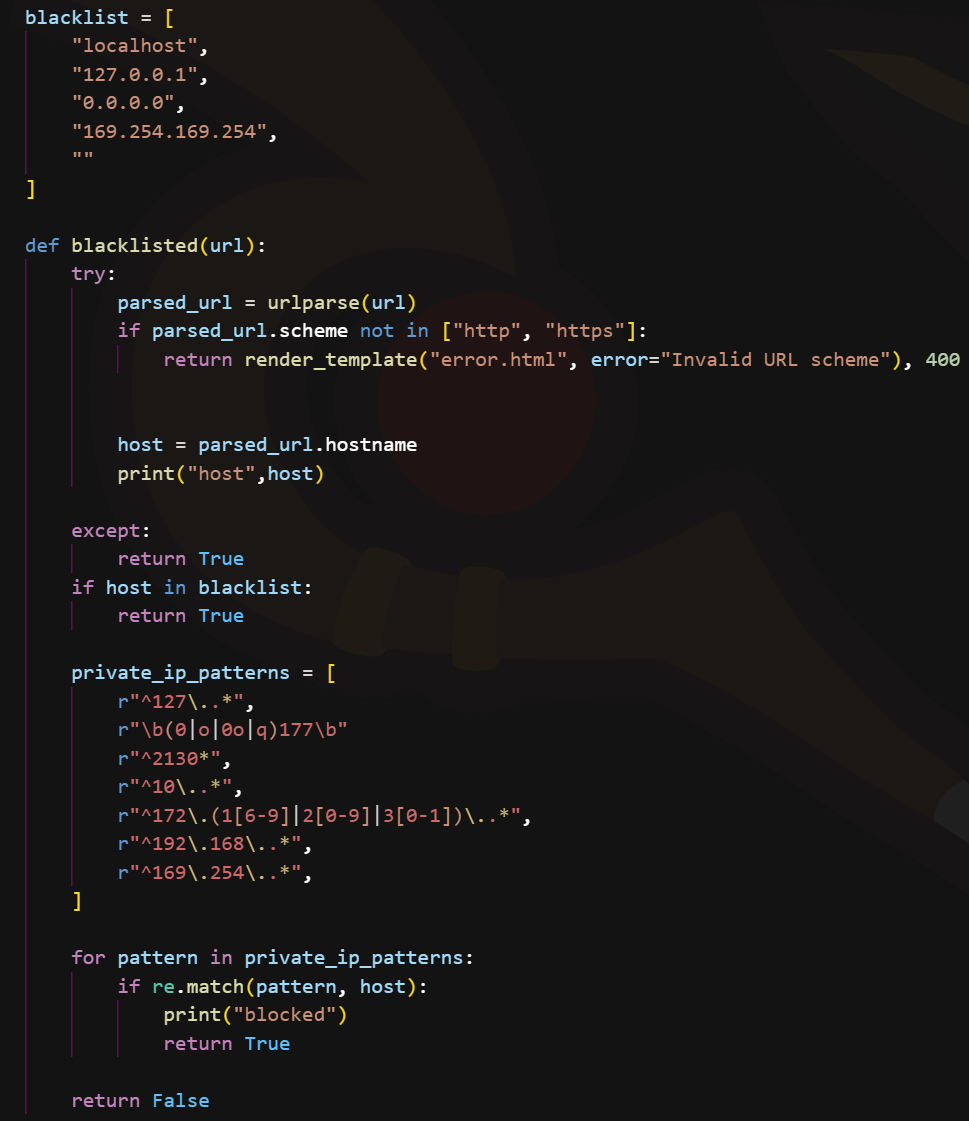
There is also a code which disallows redirection so simple redirection attacks also wont work.
This is where DNS rebinding comes in play.
This is how DNS rebinding works
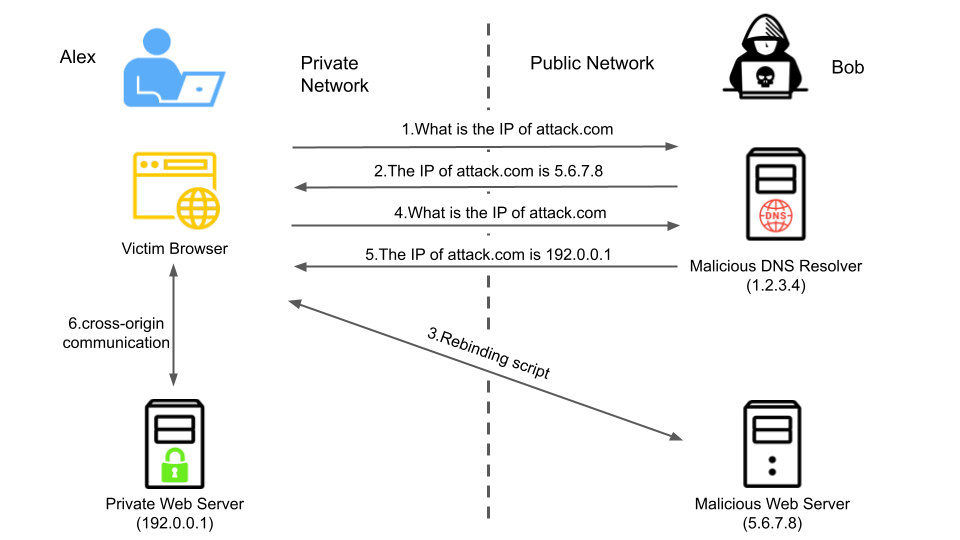
https://unit42.paloaltonetworks.com/dns-rebinding/ for more details view their article.
In simple terms, we set up a malicious DNS resolver. Then, we pass a URL that isn’t filtered by the system, allowing us to bypass the filtering mechanism. Once the URL bypasses the filter, the application queries the DNS resolver, which responds with an address of our choosing, effectively redirecting the application to the destination we want to visit.

Using this free tool https://lock.cmpxchg8b.com/rebinder.html we can perform DNS rebinding attack much more easily. than setting up our own. This website switches between the 2 addresses so it might take a few tries to get to our desired ip which is 127.0.0.1
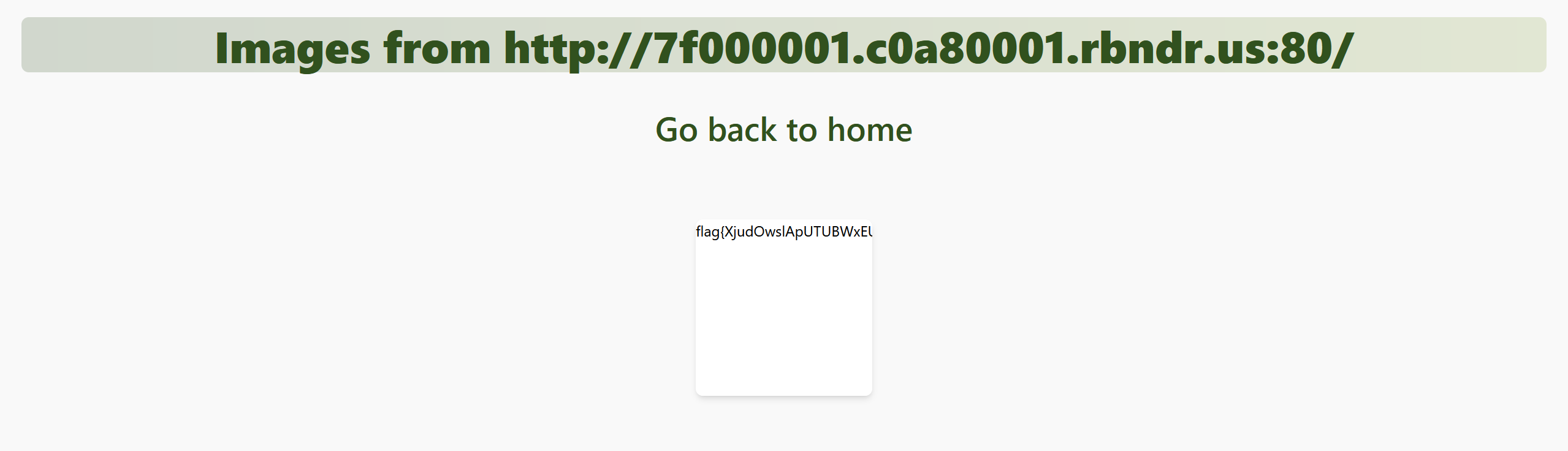
And there we go. we get our flag.
Network
1. Ping of Secrets- 1 - Easy
We are given a pcap file to analyze.
I open up the file in wireshark to analyze the file.
There are a bunch of protocols and their data in this file but the one which catches our interest is ICMP packets.
The slight hint towards ping in the title also makes our suspicion more pronounced.

Each ICMP packet is also carrying a single byte of data.
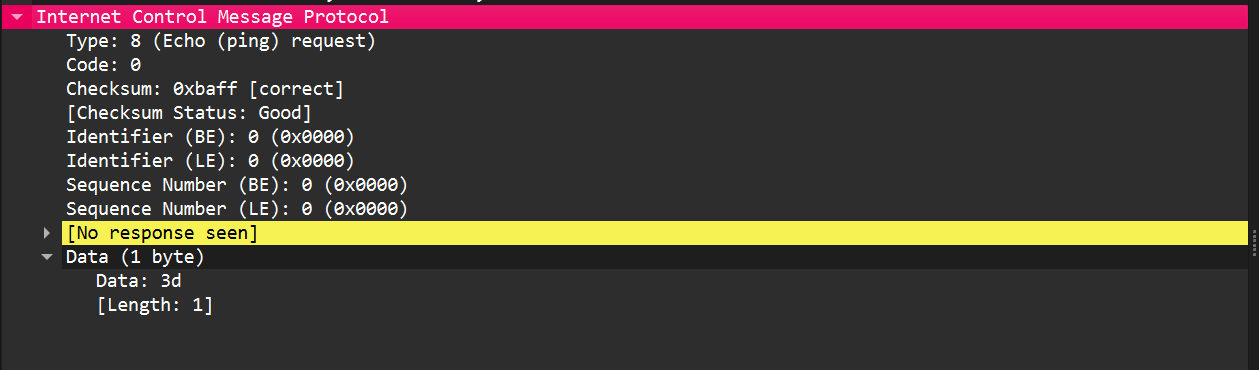
I use tshark command to extract the data into a file. I put the data into cyberchef and decode from hex. Here i found out that the data is not the flag… but all are readable
I then proceed into a loophole of extracting TCP data and then viewing it.. to no avail. then i filter the ICMP data again and look at it properly. I notice that the time stamp are not in sequence to the sr no.
So I run tshark command again. extracting time field also with it and then sorting by time.
This time when i decode the hex its a flag!
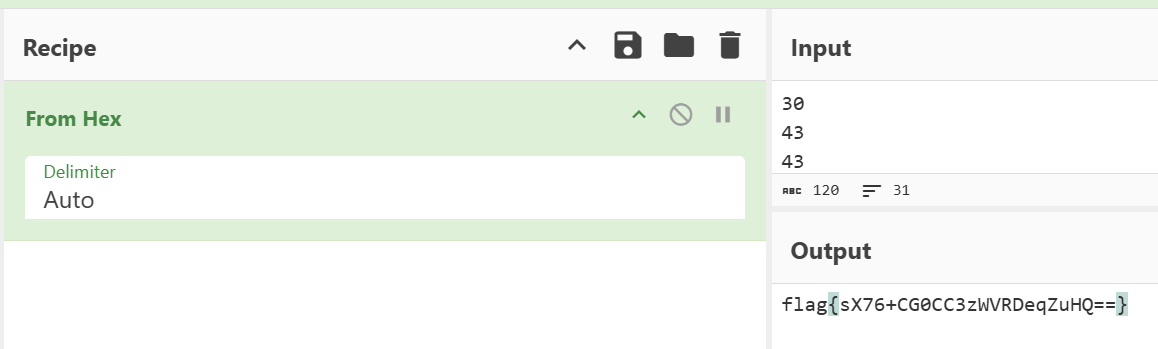
I just had to filter by time to get the flag and not the sr no.
2. Sniffer - Medium
Description - The traffic captures a coded message, carefully concealed. The final piece to solve the puzzle lies hidden in plain sight. Can you complete it?
Another PCAP challenge. I view the protocol heirarchy and expert information to get a basic idea as to what I am viewing.

From this we can gather that a lot of data is being transmitted through ICMP protocol which is odd.
Then we proceed to follow stream of UDP and after surfing we stumble upon this.
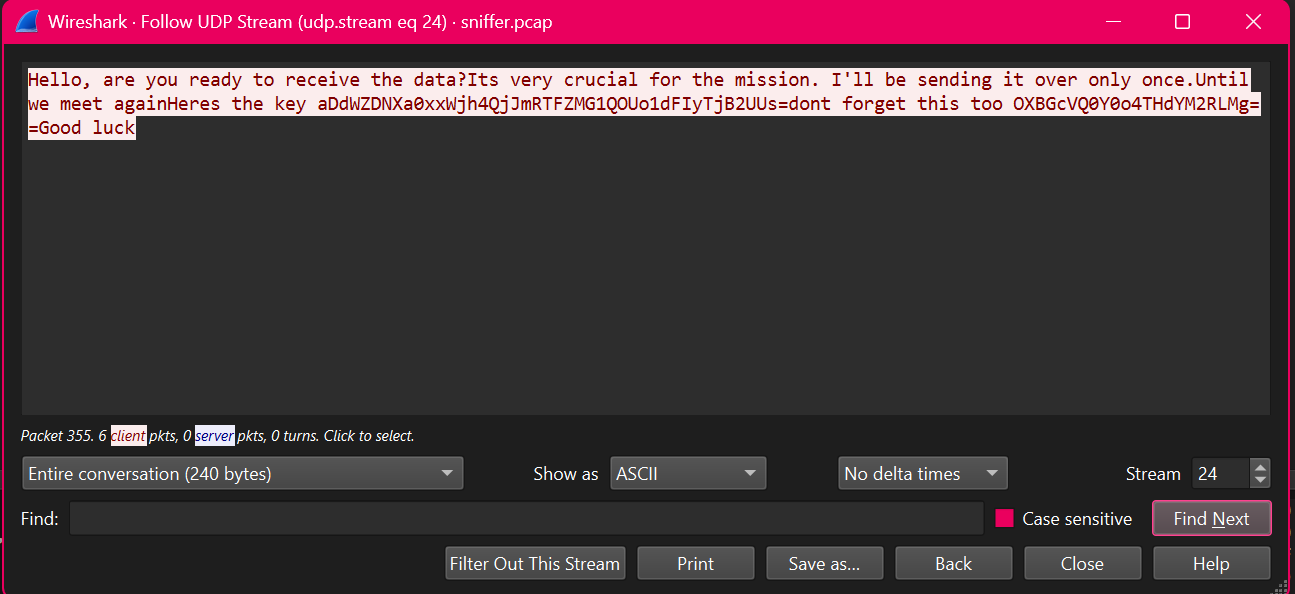
I quickly note down the key and another piece of information. Now this can mean a lot of things but my initial guess was AES as the first one is key the other will be the IV.
we then look at the packets after this message as the message said if the person was ready to receive the data.
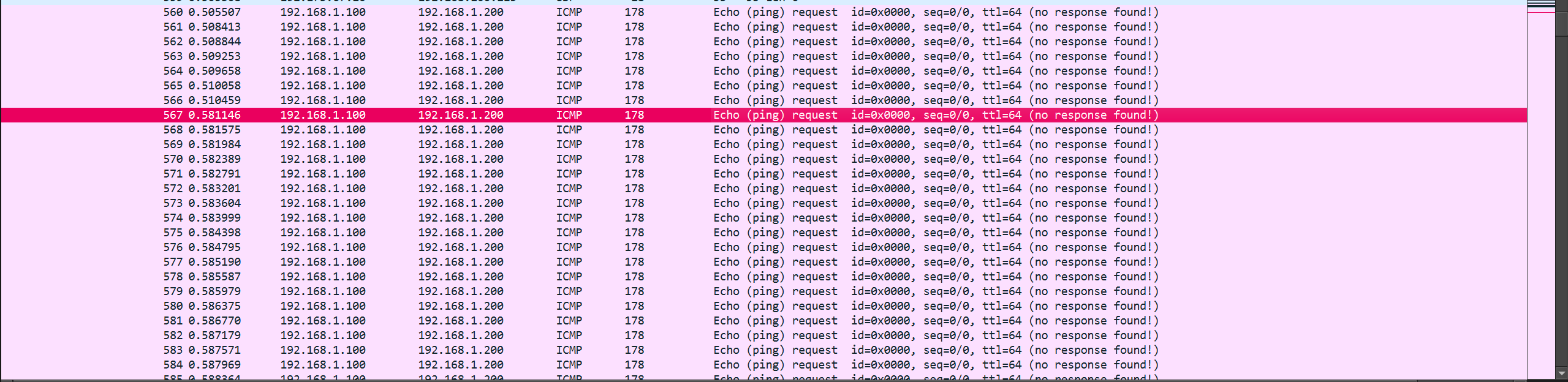
After scrolling a bit i find this huge chunk of data. each packet 150 bytes of data each.
I use tshark to extract to data from these ICMP packets.
I join all the data together and head to cyberchef
Using cyberchef to decode using AES it was a success. using the CBC mode i could see a familiar file type. PNG

Now i know that the encrypted file being sent was a PNG file.
I downloaded the file and i noticed a error.

The file was corrupted for some reason.. then i checked the file and i noticed there was no footer present that marked the end of the PNG.
It was either a mistake in extracting data or this was part of the challenge.
I checked if the time was in correct order and it was.
I then re-analyzed the pcap and noticed my mistake. there was another stray ICMP packet which caused a error when decrypting the data.

I then used another tshark command making sure i only used data from ICMP only.

And the challenge was solved
What i loved about this challenge is they included the stray data. It was very crucial to filter properly by just using ICMP packets.
3. Sinister Network - Hard
Description The Sinister six has infiltrated Stark Industries’ communication systems, attempting to steal sensitive technology blueprints. As a cyber-security specialist working with Peter Parker, you must intercept and decrypt their covert communications.
I didn’t manage to solve this during the time of the ctf. well I kinda did but due to a fatal mistake I wasn’t able to do it.
This challenge was actually much easier than the rest of the challenges although the loopholes this had were a lot.
When i first opened the pcap i noticed the timing was not matching the serial number. just like the first challenge and i filtered it by time.
The very first packets were FTP packets.

And the challenge was solved there itself… but due to my mistake I never saw the data field that was in the flag chunks and I was left filtering the whole data just to go nowhere. ( not to mention the rickrolls all other packets )

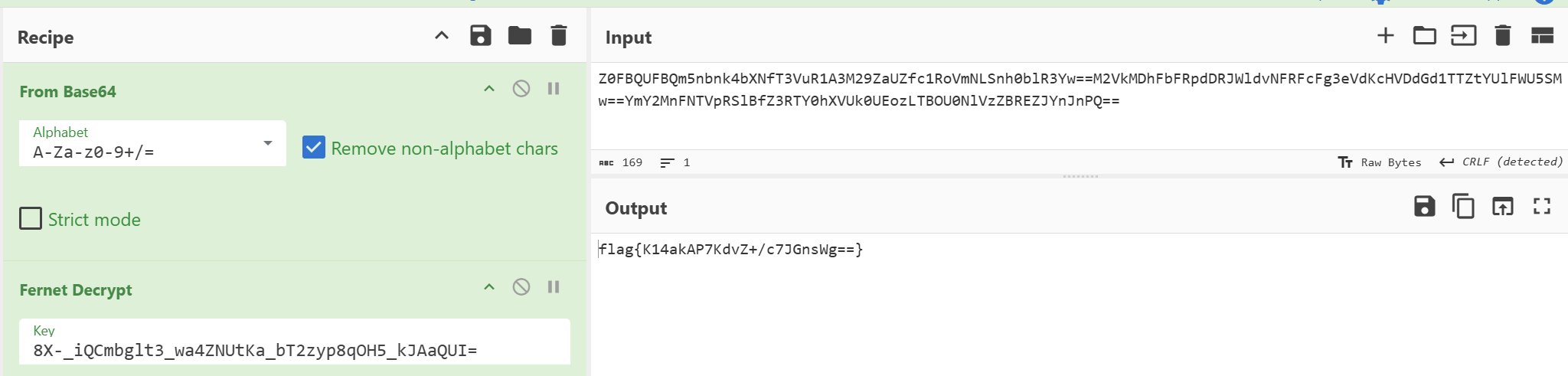
So the solution was pretty straight forward. the username and password gave away that it was fernet encryption. we just had to decode everything ( key + data ) with base64 first and we were ready to do the decryption..
This one hits hard as I had solved it in 15-20minutes but due to missing the data field completely i spent another 3-4 hours in the rabbithole… which could have been utilized for other challenges.